
Prove you work at the school
Three ways to prove it: a code sent to the school's phone, an email at the school's own domain, or a document. Pick the one that is easiest for you.
Updated 2026-10-11For anyone
Our team must know that you really work at the school. The claim page gives you three ways. You need only one.
Before you start
- You started a claim and you are on the "Prove you run …" page.
- For the phone code: you can answer the school's public phone number. It is the number shown on the listing.
- For a document: a photo or PDF of the school's state licence, business registration, or another paper with the school's name.
Steps
-
Phone code. Press Get a text or Get a call. The code goes to the school's number, not to yours.
-
Type the 6-digit code and press Check code. The code works for 10 minutes.
-
Email. If your account email ends with the school's own web domain, our team sees it. Free email services such as Gmail do not count. There is nothing to press.
-
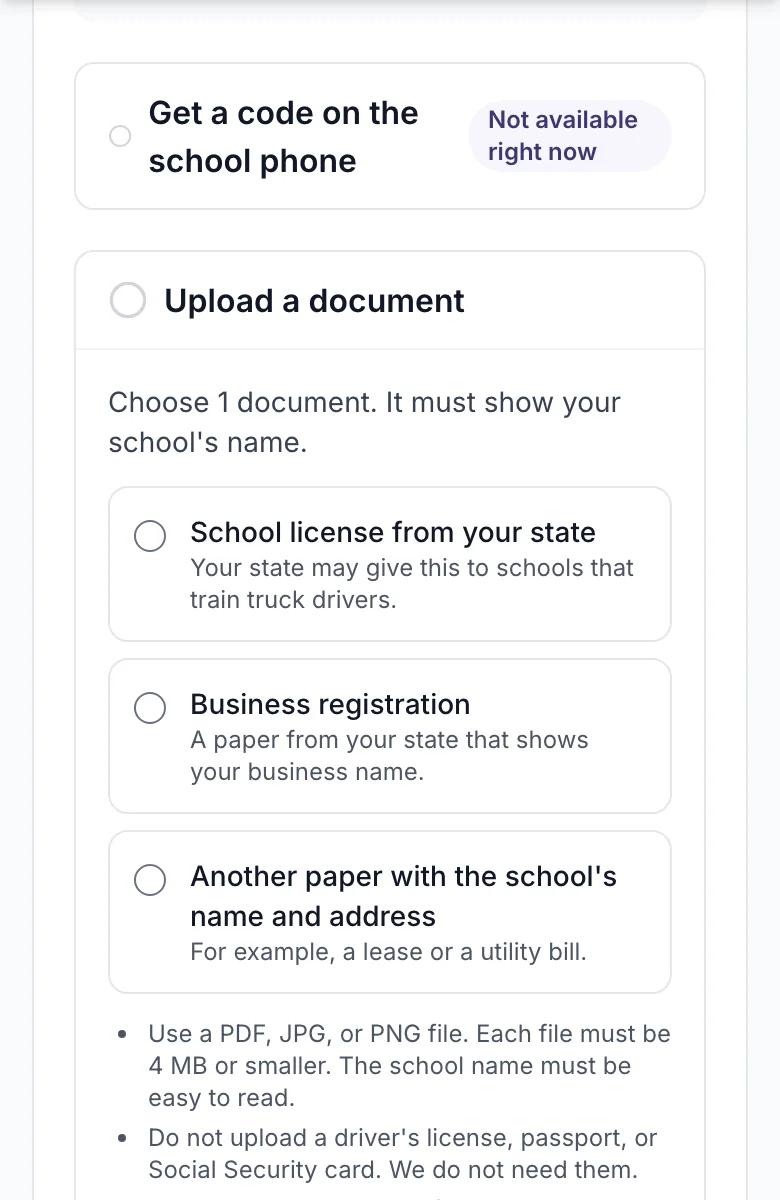
Documents. Choose the document type, press Choose file and add the file. PDF, JPG and PNG work. Each file can be up to 4 MB. You can add up to 5 files.
-
Press Send documents. The page shows how many files you sent.
-
Write a note for our team if something needs an explanation, for example a new phone number. Press Save note.
-
Press I am done.
What you will see
Under each method, the page shows what you did: "Code verified", "Files you sent: 2", or "Saved". You can come back and add more before our team decides.
If it does not work
- No code arrives. Wait 30 seconds and try the other channel, a call instead of a text. You can ask for a code 5 times per claim.
- The number on the listing is wrong. Press This is not the school's number. Our team sees that, and you can send a document instead.
- The file is refused. Use PDF, JPG or PNG, and keep each file under 4 MB. A screenshot of a document is fine.
- Three wrong codes. The page asks you to use a document instead.
What happens next
Our team reads the proof and decides, usually within 2 business days. You get an email either way. If we need one more thing, the email says what.
Related
Still stuck? Write to us